
T01 BMS Monitor User Manual v2.6
Complete guide to monitoring and configuring DS4A Battery Management Systems
Parameters Tab
The Parameters tab displays read-only configuration information from your BMS.
Accessing Parameters
- Tap the Parameters icon in the navigation bar
- Parameters load automatically when the tab is first accessed
- Use Data Export button to export all BMS values to a JSON file
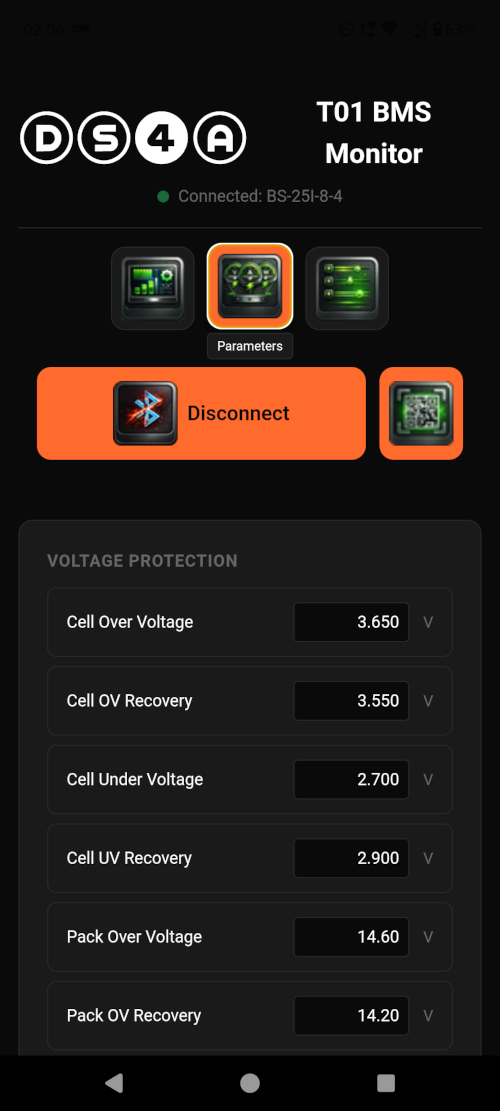
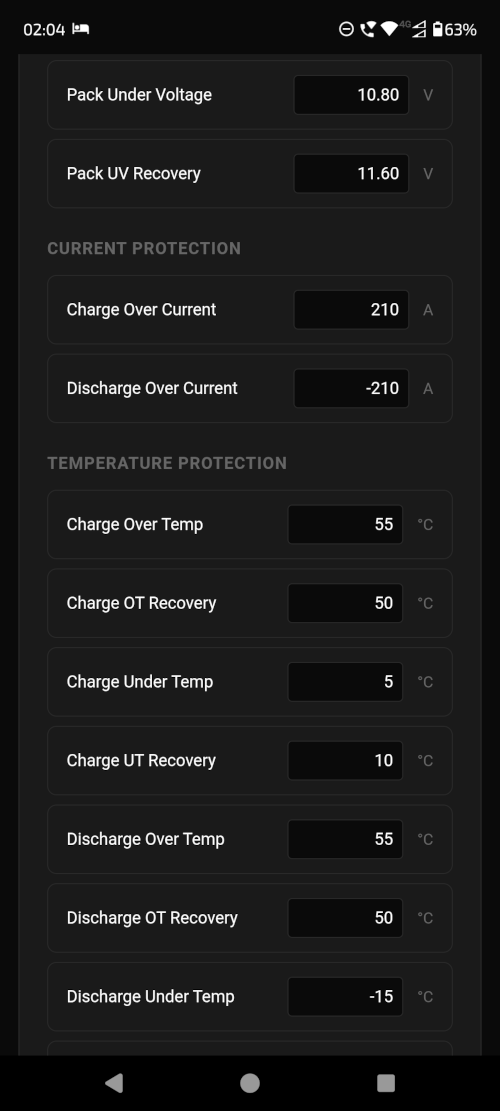

Available Parameters
Basic Information
- Design Capacity - The rated capacity of your battery pack (Ah)
- Cycle Count - Number of charge/discharge cycles recorded
Voltage Protection
- Pack Overvoltage - Protection threshold for total pack voltage
- Pack Undervoltage - Minimum safe pack voltage
- Cell Overvoltage - Maximum safe voltage per cell
- Cell Undervoltage - Minimum safe voltage per cell
Current Protection
- Charge Overcurrent - Maximum charging current allowed
- Discharge Overcurrent - Maximum discharge current allowed
Temperature Protection
- Charge Over-temp - Maximum temperature for charging
- Charge Under-temp - Minimum temperature for charging
- Discharge Over-temp - Maximum temperature for discharging
- Discharge Under-temp - Minimum temperature for discharging